Recruitment website & applicant workflow
The apply button stayed off until your résumé was approved.
Jobs Kreate is a licensed Malaysian recruitment agency placing crew and hospitality staff on cruise ships and in hotels across Asia and the Gulf. Their website listed the jobs. It just made them very hard to apply for.
This was an in-house project I took on while employed by Jobs Kreate, not an Agnes Studio client engagement.
- Employer
- Agensi Pekerjaan Jobs Kreate
- Takeover → relaunch
- 16 days · 19 May – 4 Jun 2026
- Post-launch work
- Jun 2026 → present · vacancies, articles, refinements
- My contribution
- Audit, design, build, migration, maintenance
- Stack
- Hand-coded WordPress theme
What I inherited
A WordPress job board built on a bought theme, a page builder and seventeen active plugins. It came to 1.6 GB, and roughly a fifth of that was a stale backup archive left sitting in the public web root.
The parts that mattered commercially were missing rather than broken:
- No
<h1>on any public page — homepage, about, contact, every job listing. Zero. - No meta description on a single job page. The homepage title was “Home - Jobskreate”.
- The job detail sidebar showed one field: Industry. No salary, no location, no closing date, no contract length.
- The footer showed the wrong licence number. For a licensed agency that is the one number that has to be right.
- Maps ran on a paid API with no key, so job pages carried a grey “for development purposes only” watermark.
I audited the whole install, took a full encrypted backup, and closed off outside administrator access before touching anything. Then I started over.
<h1>.
The gate before a candidate could apply
A recruiter’s website has one job: let someone who wants the work tell you so. Here is what that took on the old site, captured by the managing director on 5 May 2026 while he tested it on his own phone.
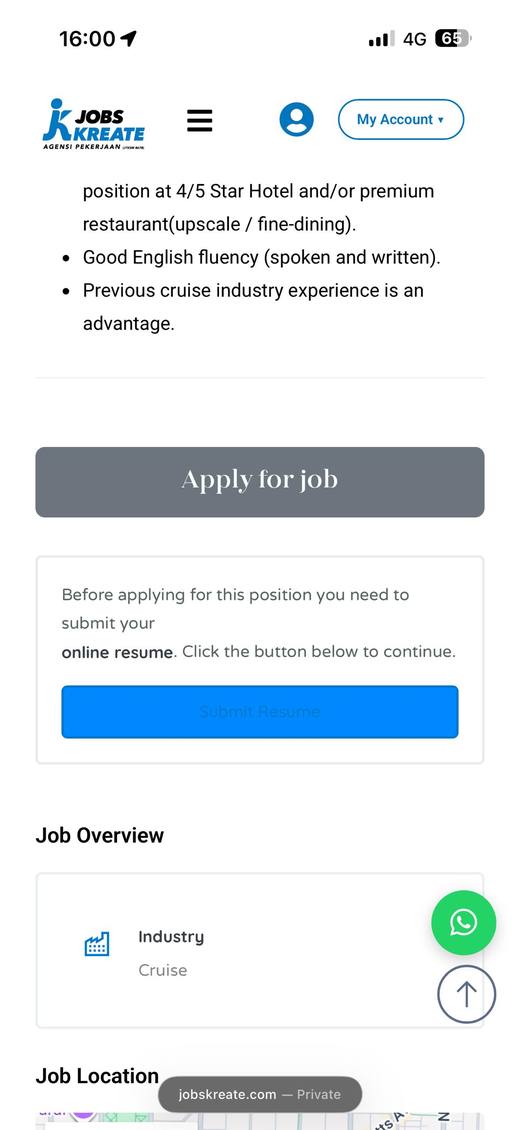
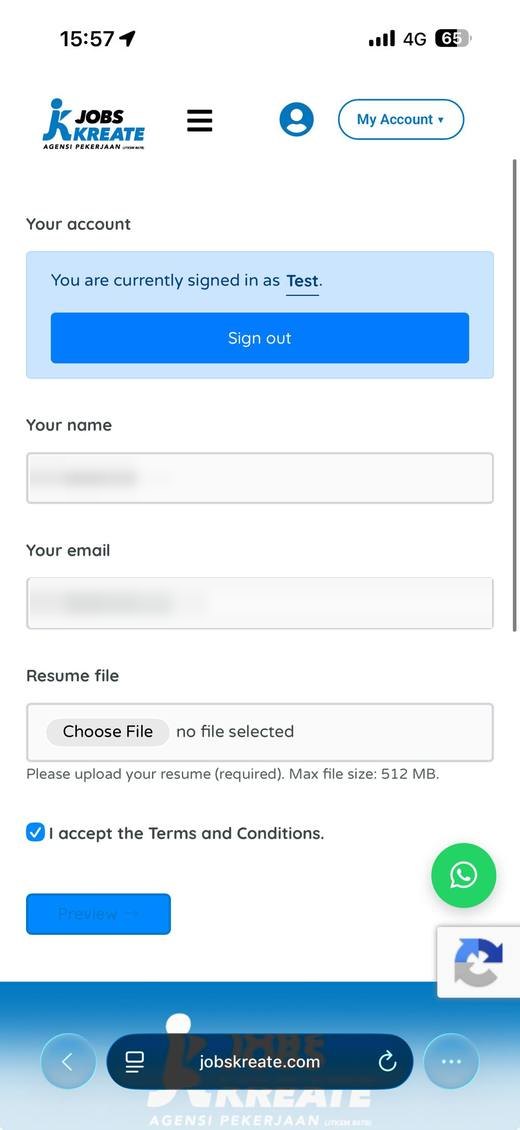
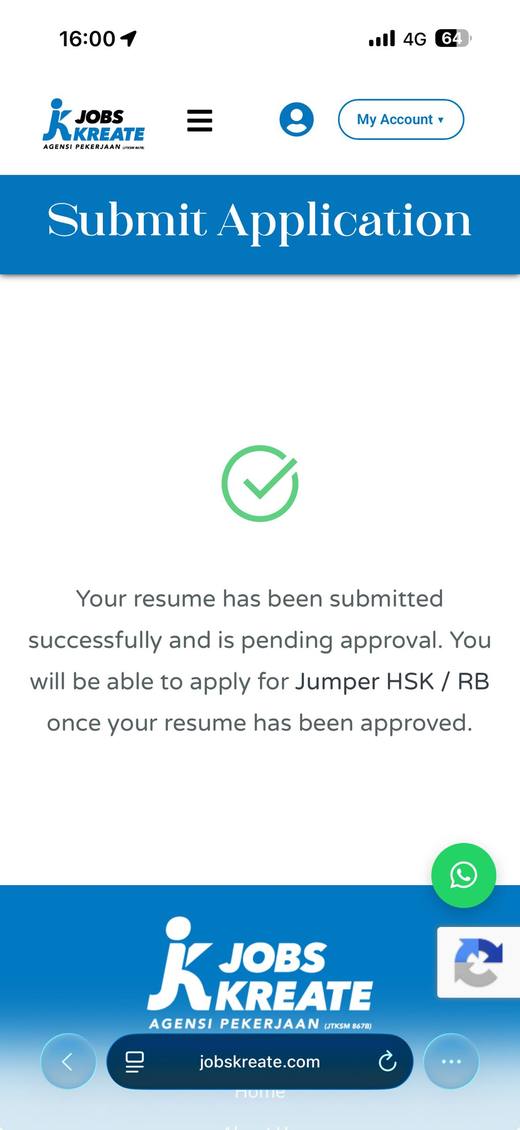
Three steps, an account, a file upload and an approval queue — before a candidate could express interest in a job.
268 candidate accounts and 339 MB of résumé files had accumulated behind that flow.For a cruise recruiter this is the wrong shape entirely. Candidates are mostly on phones, often on mobile data, frequently deciding in the moment. Every step before “I’m interested” is a place to lose them — and an approval queue isn’t a step, it’s a stop.
Keep WordPress. Replace everything in it.
My first call was to drop WordPress altogether. Two days later I reversed it, and the reversal was right.
The owner needed somewhere familiar to read enquiries and edit pages, and a hand-coded site would have meant editing PHP through a file manager. So WordPress stayed as the admin. Everything else went: the bought theme, the page builder, every paid plugin and licence.
In its place, a theme written by hand — 24 files, about 7,300 lines, including a 2,000-line design system and self-hosted fonts. No page builder, no commercial licences to renew. Three free plugins remain, each doing one job.
Rebuilding the vacancies as a structure, not a list
The old site held 128 job listings in a flat list with a keyword search box. Cruise roles repeat constantly — the same eleven job titles across a dozen shipping lines — so a flat list is unnavigable almost immediately.
I rebuilt it as a custom content type with a real taxonomy:
- Sector-first URLs — five sectors, so the address of a job says what kind of job it is.
- Per-employer pages for the cruise lines that permit being named.
- Two levels of filtering — sector, then location, department or cuisine, each rendered only where there is genuinely something to filter.
- A disclosure rule. Cruise employers are named; local hospitality employers are not, so those roles show a descriptor and a salary instead. Naming the employer and showing the pay are mutually exclusive, by agreement with the hiring client.
- Eligibility on every listing, because nationality rules differ per line and a wasted application helps nobody.
Behind it sit 62 idempotent maintenance scripts — seeding, reordering, auditing — so the catalogue can be rebuilt or rebalanced without hand-editing rows. It now runs at 266 published vacancies across five sectors and thirteen cruise lines, with sector and secondary filters where the old 128 vacancies were presented as a flat list.
How applying works now
No account. No upload. No approval. A vacancy page states the role, what’s provided, who is eligible and — where the employer isn’t named — the salary. Then two buttons: WhatsApp our team, or email your résumé.
WhatsApp is not a fallback here. It was already a primary contact channel in this recruitment operation, so the rebuilt page makes that route direct instead of putting an account and approval queue in front of it. The candidate reaches the recruitment team directly after seeing the role and eligibility information, instead of first entering an upload-and-approval queue.
The old account URLs — register, sign in, my résumé, my application — still resolve. They redirect rather than 404, because a dead link in a search result is a lost candidate too.
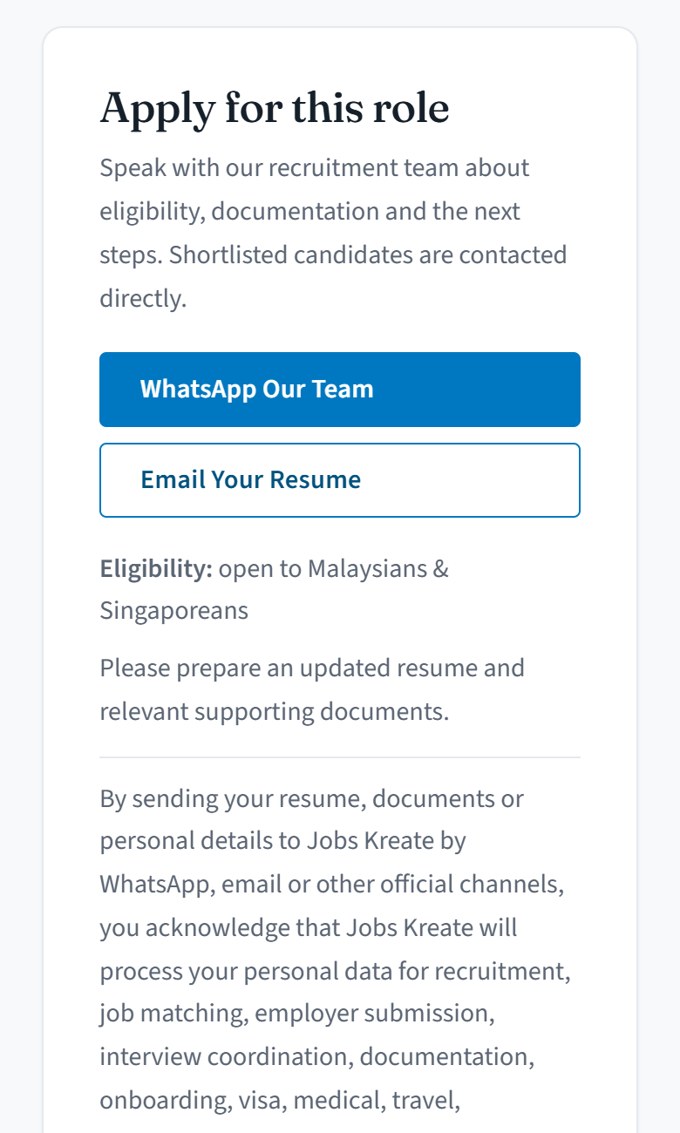
Account, résumé upload and approval queue → WhatsApp or email.
The other half: whoever has to run it
A recruitment site isn’t finished when candidates can use it. Someone at the agency has to publish roles, chase applicants and keep the thing current every week, without calling a developer to do it.
The handover training deck for the old site ran to 64 slides. Nine of them are how to change one image on the homepage: open the dashboard, find the slider plugin, open the slide, open it again in the page builder, insert media, choose the file, publish, “exit to WordPress”, then go back to the slider list to check it took.
The applicant side was worse, because enquiries landed in four separate places. Job applications sat in one module and résumés in another, each with its own approve-and-reject queue. A paid membership plugin owned the notification emails and the candidate accounts. The page builder kept a third inbox of its own for contact-form submissions. There was no single screen that answered “who got in touch this week”.
A system only its builder can operate isn’t finished. It’s a dependency.
Seventeen plugins, four inboxes, and a page builder standing between a recruiter and a job advert.Publishing a vacancy is now one screen. A Vacancy Details box holds eight fields — location, employment type, contract length, closing date, salary, benefits, eligible nationalities, employer descriptor — beside the ordering number and the job description. No page builder, no server access, no script.
The permissions matter as much as the form. The vacancy type is registered so an Editor account already has every capability the job needs. The person who does the hiring can publish the role, and nobody has to hand out an administrator login to get a vacancy live.
One gap I’ll name rather than paper over: two of the five sectors use a second-level department filter that is still set by a script instead of in that box. It’s on the list. A written walkthrough for the staff who publish roles went with the rest of it.
The operations around the website
Rebuilding the site was half of it. The other half was the operation that handles the people it reaches — which is where most recruitment websites quietly fall over, because the site and the process behind it are built by different people at different times.
I also built the recruitment CRM on the agency’s existing Microsoft 365 tenancy, without adding a separate CRM subscription or per-seat CRM licence.
Not every step needed automating
The website application route deliberately ends with a person. A candidate goes straight to the recruitment team through WhatsApp or email, without creating an account or waiting for approval. From there the team reviews the enquiry and records the appropriate information in the CRM.
Separately from the website, I built the internal applicant-intake workflow. Campaign applicants enter through Microsoft Forms; Power Automate writes the submission into SharePoint, applies the nationality rule and opens the application record. Job-portal applicants are screened against the hiring client’s brief and phone-checked before automation moves the appropriate record into the internal workflow. None of this is connected to the website.
They solve different problems. The automated workflow removes repetitive routing and record handling; the website keeps the point that needs human judgement human.
Two separate flows, not one pipeline
The website route — human
Candidates contact the recruitment team through WhatsApp or email. There is no website form, account or approval queue, and no CRM record is created automatically.
The automated intake workflow — separate
Candidates arriving through advertising campaigns and job portals can enter a separate Microsoft Forms → Power Automate → SharePoint workflow. The website does not link to it and does not feed it.
What keeps them in step
The website and the intake forms are separate systems that have to agree. Adding one new role means editing the website, both intake forms and the automation that reads them — and if you miss the fourth, an application lands in the CRM with a blank position and nobody notices until someone reads it.
So the sync is a written procedure with verification built in, not something held in one person’s head. That is the part that makes a system survive the person who built it.
What changed
| Inherited | Rebuilt | |
|---|---|---|
| Mandatory gates before applying | Account, sign-in, résumé upload and approval | None |
| Published vacancies | 128 · at takeover | 266 · Aug 2026 |
| Active plugins | 17 | 3 |
| H1 per page | 0 | 1 |
Structural measurements from the site I inherited and the site that replaced it. They describe what changed in the product — not application volume, conversion or placements. Catalogue growth continued after relaunch, so the vacancy count is a published-record count rather than a result of the rebuild.
The migration
218 live URLs were inventoried before cutover: 8 preserved exactly, 52 given individual redirects, and around 155 more covered by six rules. Cutover ran on 4 June 2026. Eight of those redirects were sampled again in late August — 86 days later, all eight still resolved correctly.
Then I measured my own build
The June relaunch wasn’t the end of the work. In August I measured the homepage again, found places where it was doing too much, and simplified it. These figures compare my June build against the August revision — my own work against itself, not against the site I replaced.
| June | August | |
|---|---|---|
| Homepage sections | 15 | 10 |
| Homepage words | 1,802 | 940 |
| Homepage length, desktop | 13,955 px | 7,902 px |
| First contentful paint, mobile | 2.9 s | 1.0 s |
| Lighthouse accessibility | 95 | 99 |
Lighthouse figures are point-in-time lab measurements taken with the same mobile test setup, not field data from real visitors. The same August check returned 100 for Best Practices and 100 for SEO.
Also built
A 27-article content hub across three streams — candidate guides, employer resources and company news — written to support the vacancies rather than to chase keywords. Structured data for job postings and for the agency itself. A PDPA privacy notice and terms of use.
What I’m not claiming
No business-outcome baseline was recorded before the rebuild, so there is no honest before-and-after for applications received, candidates placed, or time saved per hire. I could estimate those. I’d rather not.
Everything in the tables above is measured — from the live site, the migration record, or a Lighthouse run. The application-flow screenshots were taken by the agency’s managing director on the old site, before it was replaced. Where I don’t have a number, there isn’t one.
Measurement is now part of how I start a project. The reason this case study can’t show a conversion lift is that conversion wasn’t being measured beforehand — which is exactly the mistake worth not repeating on the next one.